Estimated monthly budget
$0.00 /month
$0.00 /day average
Business
Data last verified: September 2026 · Built by Muhammad Ayaz Akhtar
Work out a realistic LinkedIn ads budget before you set up a campaign. Enter your monthly click or impression goal and this LinkedIn ads budget calculator turns it into an estimated monthly spend, based on a real published B2B advertiser benchmark, not a guessed number.
Using the CPC: $3.62 average cost per click
Estimated monthly budget
$0.00 /month
$0.00 /day average
Practical minimum
$300.00 /month
$10.00 /day, a widely-reported floor for gathering meaningful data
Based on Databox B2B LinkedIn Ads survey (average CPC/CPM, February 2023). LinkedIn ad costs vary significantly by industry, audience seniority, and region, treat this as a planning estimate, not a guaranteed price.
Based on Databox B2B LinkedIn Ads survey (average CPC/CPM, February 2023), not a guessed average.
"How much should I budget for LinkedIn ads?" is one of the most common questions a marketer or small business owner asks before touching Campaign Manager for the first time, and most answers online are either a vague "it depends" or a single made-up number. This calculator gives you something more useful: a published cost benchmark, applied to your own specific goal.[1]
Enter a monthly goal for whichever one matches your actual objective, and the calculator multiplies it by the relevant average rate to estimate a monthly budget.
The average rates used here, $3.62 per click and $26.91 per 1,000 impressions, come from a Databox survey of B2B advertiser accounts (159 companies for CPC, 51 for CPM), published February 2023.[1] This is meaningfully different from the government data BillableWise's other calculators use: USDA and federal housing data are official, singular, and updated on a known schedule. LinkedIn ad costs are not published by LinkedIn itself in aggregate, so the best available benchmark is a third-party advertiser survey, dated, and subject to real variation by industry, audience seniority, and region.
LinkedIn's own current help documentation does not publish a single fixed minimum ad budget. It states the minimum for a lifetime budget depends on your campaign's duration and is shown to you directly inside Campaign Manager, not a flat number published anywhere else.[2]
A $10-a-day floor turns up again and again in advertiser guides as a practical starting point regardless of that dynamic minimum, and this calculator uses it as a reference "practical minimum," clearly separate from the CPC/CPM-based estimate, so you can see both a data-driven number and a sanity-check floor at once.
| Figure | Value |
|---|---|
| Average CPC (B2B) | $3.62 |
| Average CPM (B2B) | $26.91 |
| Practical minimum daily budget | $10 |
| Practical minimum monthly budget | $300 |
This calculator estimates ad spend only. It does not include the cost of ad creative production, landing page development, or your own time managing the campaign. It also does not predict clicks, conversions, or leads from a given budget, LinkedIn's own Campaign Manager gives a real-time forecast once you have an actual account and targeting set up, which will always be more accurate than an outside average.
Source: Databox B2B LinkedIn Ads survey (average CPC/CPM, February 2023).
The calculator handles both objectives, but most campaigns are really optimizing for one or the other. Here is how to tell which applies to you.
You want people to leave LinkedIn and land on your website, a landing page, a signup form, or a piece of content. You only pay when someone actually clicks, which makes cost-per-click budgeting straightforward to reason about: more budget buys roughly proportionally more clicks.
Your goal is visibility with a specific professional audience rather than an immediate click, for example building recognition with decision-makers in a target industry ahead of a sales push. Cost-per-1,000-impressions budgeting fits here, since you are paying for exposure, not action.
If you are not sure which applies, start with clicks. It is the more common objective for small businesses and easier to tie directly to a result (a visit, a signup, a download) that you can track.
Every number below is computed by the same formula the calculator above uses, using the average B2B CPC/CPM figures.[1]
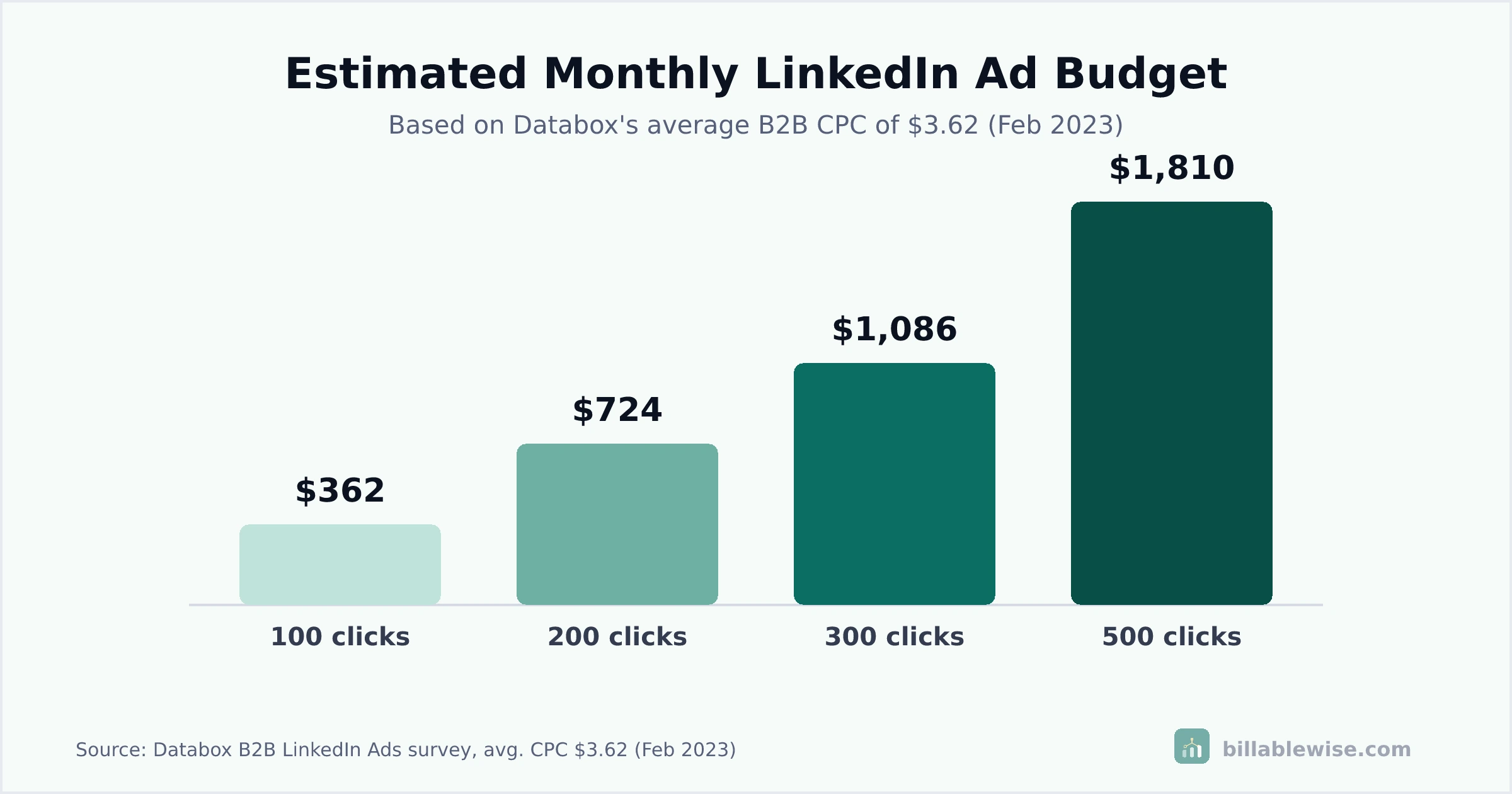
Goal: 200 clicks/month. At $3.62 average CPC, estimated budget: $724.00/month ($24.13/day).
Goal: 500 clicks/month. At $3.62 average CPC, estimated budget: $1,810.00/month ($60.33/day).
Goal: 50,000 impressions/month. At $26.91 average CPM, estimated budget: $1,345.50/month ($44.85/day).
Goal: 100,000 impressions/month. At $26.91 average CPM, estimated budget: $2,691.00/month ($89.70/day).
Goal: 30 clicks/month. At $3.62 average CPC, estimated budget: $108.60/month ($3.62/day), below the $300/month practical minimum. Budget at least the practical minimum instead of this smaller calculated figure.
An estimated budget only helps if it changes what you actually enter into LinkedIn's own ad platform. Here is how to put it to work.
Campaign Manager asks for a daily or lifetime budget, not a monthly one directly. Divide your monthly estimate by 30 for a daily figure, or by your exact campaign length for a lifetime figure, and enter that instead of guessing.
Once you set up targeting inside LinkedIn, Campaign Manager shows a real, account-specific forecast based on live auction data, which is always more accurate than this outside estimate. Use this calculator before you get to that stage, for planning and budget conversations, then trust LinkedIn's own numbers once you are configuring a campaign.
If your calculated goal-based budget comes in below the practical minimum shown above, budget the higher figure anyway.
A very small daily spend often does not generate enough data for LinkedIn's delivery algorithm to optimize effectively, so you end up with worse performance per dollar than a slightly larger, steadier budget would deliver.
Once your campaign has run for a week or two, look at your account's actual average cost per click or per thousand impressions. It will likely differ from the benchmark average here, sometimes higher for a competitive or senior audience, sometimes lower for a broader one. Recalculate future budgets using your own real number, not the general benchmark, once you have it.
The numbers here cover ad spend only. Set aside a separate line item for ad design, copywriting, and any landing page you send traffic to, since even a precisely targeted, competitively priced campaign still underperforms if the destination it sends people to is not built to convert.
Total spend alone does not tell you whether a campaign is working. Divide your actual spend by the number of results you care about, clicks, signups, or whatever you are optimizing for, to get a real cost per result, and compare that figure week over week rather than judging performance by the raw dollar total.
A LinkedIn ad budget is one input into growing the business, not the only one. If the growth this campaign drives means you will need to hire, our Payroll Cost Calculator can help you budget that side of the same growth plan, salary is only part of what a new hire actually costs.
Most wasted LinkedIn ad spend does not come from bad luck. It comes from a handful of predictable planning mistakes.
A budget well below the practical minimum often cannot generate enough impressions or clicks for LinkedIn's algorithm to learn what is working. If your goal-based estimate comes in very low, treat the practical minimum as your real starting budget instead.
The $3.62 average CPC used here is a broad B2B average. A campaign targeting senior executives, finance, or legal professionals specifically will typically cost more per click than a campaign targeting a broader, junior-level audience, sometimes considerably more.
Ad spend is only part of a campaign's real cost. Skimping on ad creative or sending clicks to a weak landing page wastes the click budget you already paid for, regardless of how well the targeting itself performed.
Your real cost per click will differ from any outside benchmark once your account has actual data.
Continuing to plan future budgets off the original estimate, instead of your own account's real numbers, leaves money on the table in either direction.
You do not need a bigger budget to get better results. For most campaigns, the easiest gains come from targeting precision and creative quality, not raw spend.
A tightly targeted audience of the exact job titles, industries, or company sizes that actually buy from you wastes less of every dollar on impressions or clicks from people who were never going to convert.
Widening your budget on loose targeting usually just buys more of the same low-value clicks.
Run a small budget across two or three different ad variations first, then shift more budget toward whichever performs best once you can see real click and conversion data. Scaling an untested ad wastes the increase.
Mixing both goals in a single campaign with a single objective setting usually serves neither well. If you want both, run two separate campaigns with separate budgets and separate goals, so each one is optimized for what it is actually trying to achieve.
Checking in weekly catches a cost spike or underperforming ad early enough to adjust, rather than discovering at the end of the month that the whole budget went to an audience or ad variation that was not working.
Once you find an audience and ad combination that performs well, increasing its budget usually has a better, more predictable return than splitting the same total budget across an untested new idea.
Decide whether you are optimizing for clicks or for impressions, then multiply your monthly goal by the average cost for that unit: clicks by cost-per-click, impressions (in thousands) by cost-per-thousand-impressions. This calculator does that multiplication for you using a published B2B benchmark, and also shows a commonly cited practical minimum so a very small budget does not undercut your own campaign.
It depends entirely on your goal, there is no single "good" number. A small test campaign aimed at 100 clicks a month lands around $362/month at average B2B rates; a larger campaign aimed at 500 clicks a month lands around $1,810/month. Enter your own click or impression goal above for a number matched to what you are actually trying to do.
LinkedIn's own current help documentation does not publish one fixed minimum dollar figure, it states that the lifetime-budget minimum depends on your campaign's duration and is shown to you directly inside Campaign Manager when you set it up. A $10/day floor shows up across most advertiser guides as a practical starting point, and this calculator uses that as a reference minimum, but treat it as commonly cited guidance, not a number LinkedIn guarantees.
Based on a Databox survey of B2B advertiser accounts, average cost per click was $3.62 and average cost per 1,000 impressions was $26.91. Actual costs vary a lot by industry, audience seniority, and region: campaigns targeting senior or highly specific job titles typically cost more per click than broad, junior-level targeting.
A Databox survey of 159 B2B companies found an average cost per click of $3.62. This is the figure this calculator uses for its clicks-based estimate. It is a real, dated survey average, not a price LinkedIn guarantees, and more competitive or senior-level audiences commonly cost more per click than this average.
The same Databox survey, across 51 B2B companies, found an average cost per 1,000 impressions of $26.91. This calculator uses that figure for its impressions-based estimate. Costs vary by audience specificity and industry, and this figure will drift over time as the LinkedIn ad market changes.
That depends on your product and audience, not a universal yes or no. LinkedIn tends to work best for businesses selling to other businesses or targeting a specific professional audience by job title, industry, or seniority, since that precision targeting is LinkedIn's core advantage over cheaper, broader ad platforms. If your customer is a general consumer audience, a lower cost-per-click platform is usually a better starting point.
Start small and treat your first month as a test, not a full campaign: a budget around the practical minimum of $300/month is enough to see how your own numbers behave without a large commitment. Use this calculator to translate a specific, modest goal, for example 80-100 clicks, into a starting budget, then scale up once you know your own real cost per click.
This calculator does not estimate cost-per-lead. Lead conversion rates vary enormously by industry, offer, and landing page, far more than click or impression costs do, and no single dependable, sourced benchmark covers that variation accurately enough to publish here. Use this calculator's click-based estimate for your ad spend, then apply your own website's actual visitor-to-lead conversion rate to estimate lead cost.
CPC (cost per click) charges you only when someone clicks your ad, which suits campaigns optimizing for website traffic. CPM (cost per 1,000 impressions) charges you for how often your ad is shown, regardless of clicks, which suits campaigns optimizing for brand visibility rather than direct clicks. Pick CPC if you mainly care about people visiting your site; pick CPM if you mainly care about how many people see your brand.
Yes, significantly. Industries that compete for the same senior, high-value professional audience, like financial services, B2B software, and healthcare, tend to see higher costs per click than industries with broader, less competitive targeting, like retail or education. This calculator uses one overall B2B average rather than an industry-specific figure, since no confirmed per-industry breakdown was available at the time this was built.
Yes. This calculator is completely free, with no account, signup, or download required. Enter your goal and get an estimated budget instantly.
LinkedIn's Campaign Manager gives you a forecast based on your specific account, targeting, and real-time auction data, which is more precise than any outside estimate can be. This calculator is a quick planning tool for before you get to that stage, useful for a rough number when writing a marketing plan or comparing LinkedIn against other channels, not a replacement for LinkedIn's own in-platform forecast once you are setting up a campaign.
Multiply your target number of clicks (or thousands of impressions) by the relevant average rate above. As a reference point, 200 clicks a month lands around $724 at average B2B rates, and 500 clicks a month lands around $1,810. Adjust up if you expect a competitive, senior-level audience, or down if you are running a small initial test.
The underlying benchmark data comes from B2B advertiser accounts, so it may not reflect consumer-focused campaigns as accurately. LinkedIn skews heavily toward professional, B2B use, and most published cost benchmarks reflect that, so B2C advertisers should treat the numbers here as a rough starting point rather than a precise fit.
The CPC and CPM figures come from a dated Databox survey (February 2023), the most specific, directly verifiable benchmark available at the time this calculator was built. Ad costs shift with market competition over time, so treat these figures as a reference point and check for a more recent published benchmark if you need current, precise numbers.
This calculator does not estimate click-through rate, since it is a budget planning tool, not a performance forecaster. Your own account's real click-through rate depends heavily on your ad creative, targeting precision, and offer, and will only become accurate once you have live campaign data of your own to look at.
No. This calculator uses general Sponsored Content-style CPC and CPM benchmarks. Other formats, like Message Ads (Sponsored InMail) or Conversation Ads, are typically priced and billed differently, and a solidly sourced benchmark for those specific formats was not available to include here.
They target differently, not competitively. Google Ads generally reaches people actively searching for a solution, while LinkedIn reaches people by professional profile, job title, industry, and seniority, whether or not they are searching at that moment. LinkedIn tends to cost more per click but lets you reach a specific professional audience that search intent alone cannot target. Many B2B advertisers run both: Google for people already looking, LinkedIn for building awareness within a defined target audience.