
Social Security
$0.00
Find out what an employee actually costs before you hire. Enter a salary and this calculator shows the exact employer payroll taxes you owe, plus a total true cost including benefits, based on current federal rates and real government compensation data.
Social Security
$0.00
Medicare
$0.00
Federal Unemployment (FUTA)
$0.00
Benefits (national estimate)
$0.00
Total true cost of this employee
$0.00
0.0% above salary alone
Social Security is capped at the 2026 wage base of $184,500.00. Benefits are your own figure if entered, otherwise a national average estimate based on Bureau of Labor Statistics: Employer Costs for Employee Compensation, March 2026. State unemployment tax and workers' compensation vary by state and industry and are not included.
Based on PayrollOrg: 2026 Social Security wage base and rates, not a guessed average.
"How much does an employee actually cost?" almost always gets answered with just their salary, which understates the real number by a third or more. This calculator computes the two real components separately: your exact employer payroll tax obligation, and an estimate of benefits cost, then combines them into one true total.
These three are calculated exactly, with the Social Security wage-base cap applied correctly, not estimated or rounded.
Enter your own actual annual benefits cost per employee if you know it. If you leave it blank, this calculator estimates total compensation using the Bureau of Labor Statistics' own ratio: wages make up 69.9% of total compensation for private industry workers, benefits make up the remaining 30.1%.[2]
BLS's own benefits figure already includes legally required costs like Social Security, Medicare, and unemployment insurance, not just voluntary benefits like health insurance. This calculator accounts for that directly: when using the national average, it does not add its own precisely computed payroll taxes on top of the BLS benefits estimate, since that would double-count the same legally required costs twice.
| Figure | Value |
|---|---|
| Social Security employer rate | 6.2% |
| 2026 Social Security wage base | $184,500 |
| Medicare employer rate | 1.45% |
| FUTA net rate | 0.6% |
State unemployment tax (SUTA) and workers' compensation insurance are employer costs, but both vary by state and, for workers' comp, by job risk classification, so no single national default would be accurate. Add your own state's SUTA rate and a workers' comp quote from your carrier to this calculator's total for a complete picture.
Source: PayrollOrg: 2026 Social Security wage base and rates.
This calculator gives you two numbers at once, and each one matters most in a different situation.
You already know your exact benefits cost separately and just want to confirm the federal tax portion, or you offer minimal formal benefits and want the most precise number you can act on immediately.
You already provide health insurance, a retirement match, or other formal benefits and know roughly what they cost per employee. Entering your own number is always more accurate than a national average for your specific business.
You are budgeting for a role you have not filled yet and do not have your own benefits number to work from. A well-known independent rule of thumb from MIT lecturer Joseph Hadzima puts total cost at roughly 1.25 to 1.4 times salary,[3] and this calculator's own government-sourced estimate lands close to the top of that range, a useful cross-check that the number is realistic.
If you are not sure, start with the national average estimate for early planning, then switch to your own real benefits figure once you know it.
Every number below is computed by the same formula the calculator above uses.
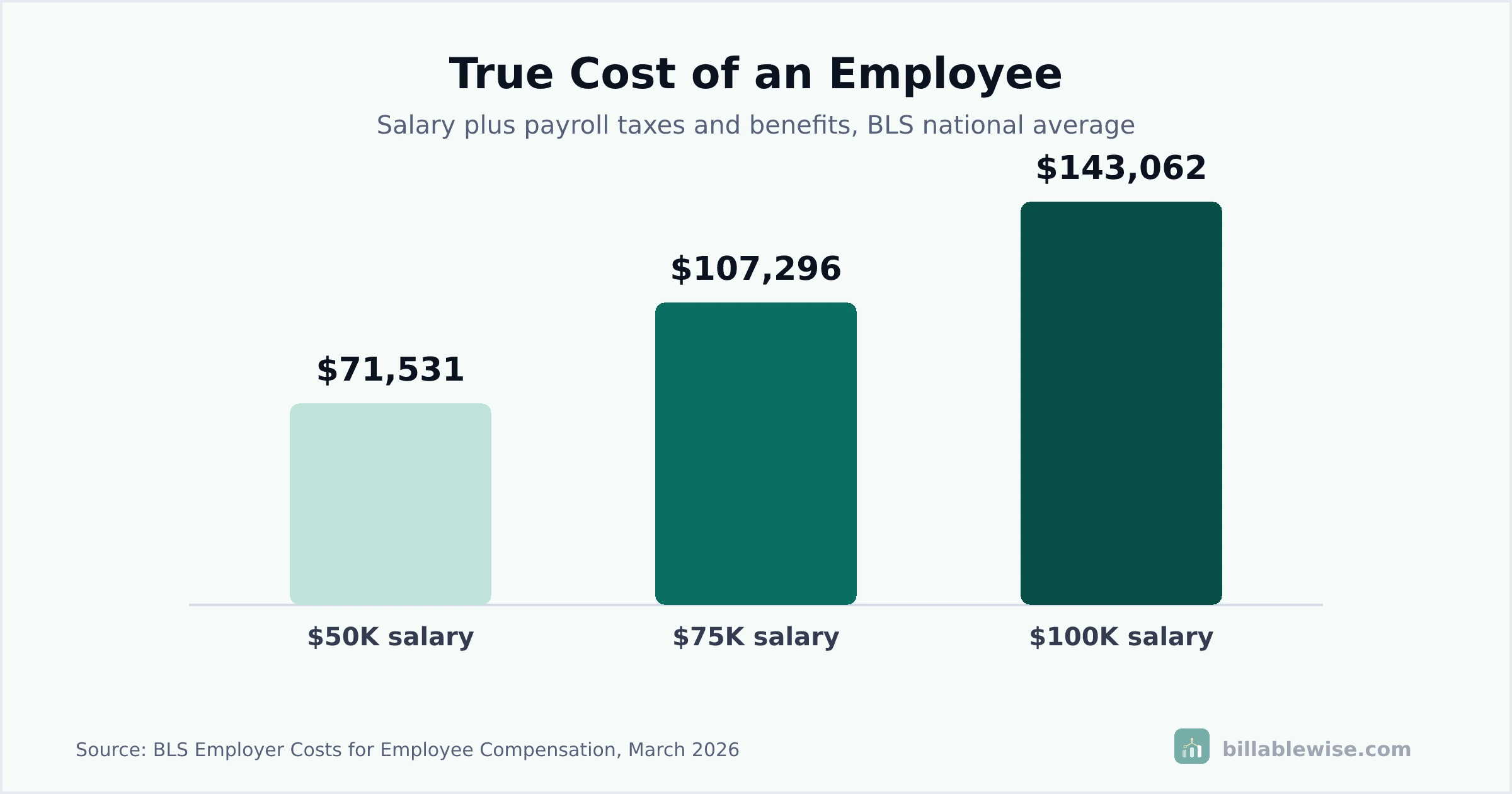
Payroll taxes: $3,867.00. Estimated benefits: $17,663.76. Total true cost: $71,530.76 (43.1% above salary).
Payroll taxes: $5,779.50. Estimated benefits: $26,516.64. Total true cost: $107,296.14 (43.1% above salary).
Payroll taxes: $5,779.50. Your benefits: $12,000.00. Total true cost: $92,779.50 (23.7% above salary).
Payroll taxes: $7,692.00. Estimated benefits: $35,369.52. Total true cost: $143,061.52 (43.1% above salary).
Payroll taxes: $14,381.00 (Social Security capped at the wage base). Total true cost: $286,123.03 (43.1% above salary).
A true cost figure only helps if it changes your actual hiring and budgeting decisions. Here is how to put it to work.
When approving a new headcount or building an annual budget, use this calculator's total true cost figure, not the salary alone, so you are not surprised by the real cash outlay once taxes and benefits are added.
If your own actual benefits figure comes in well below the national average estimate, that is not necessarily a problem, it may simply mean your benefits package is leaner than the private-industry average. Use it as a data point for benchmarking, not an automatic target to hit.
This calculator's federal tax figures are exact, but your own state's unemployment tax rate and a workers' compensation quote add on top of them. Get both from your state and insurer before treating this total as final.
The Social Security wage base increases most years.[1] Re-check this calculator, especially for higher earners near the cap, when planning a new fiscal year's budget rather than reusing last year's figure.
A raise for an existing employee only adds the marginal payroll tax and any benefits change, while a new hire adds the full true-cost figure from zero. Running both through this calculator side by side makes that comparison concrete instead of a guess.
Most payroll budgets that come in over plan are not the result of bad luck. A handful of specific, avoidable mistakes explain most of the gap.
Treating the offer salary as the full cost of a hire routinely understates the real number by 25% to 45% or more once taxes and benefits are added. Budget the total true cost from the start, not salary with taxes as an afterthought.
Social Security tax stops applying once an employee's wages cross the annual wage base.[1] Assuming a flat percentage applies to a high earner's entire salary overstates that specific employee's tax cost.
Adding a national benefits-percentage estimate on top of a separately computed payroll tax figure counts Social Security, Medicare, and unemployment tax twice, since those are already part of what "benefits" means in most published compensation statistics. This calculator avoids that by design, see "How this calculator works" above.
State unemployment tax and workers' compensation insurance are sometimes substantial costs that this calculator does not estimate. Skipping them entirely, rather than adding your own state's figures, leaves a gap in the budget.
Lowering the true cost of your team does not have to mean lower salaries. For most businesses, a few specific choices move the number more than pay cuts would.
Health insurance and other benefit costs are negotiable and change year to year. Reviewing quotes annually, rather than automatically renewing, is one of the more effective ways to lower the benefits portion of true cost without touching pay at all.
SUTA rates are often based on an employer's claims history and can be appealed or improved over time with fewer claims. A high experience-rated SUTA rate can add thousands of dollars a year that a flat-rate assumption misses, so confirm your current rate with your state workforce agency.
Letting employees choose which benefits they value most, within a fixed employer contribution, can deliver more perceived value per dollar than a one-size-fits-all package, without necessarily raising total cost.
For a role near or above the wage base, a January start date means the full year's Social Security wage base cap applies from day one, while a hire made after another employer has already withheld a full year's worth for that employee does not reset the cap in your favor, plan hiring timing around your own fiscal year rather than assuming taxes reset per employer.
If a growing team is straining your budget, sourcing candidates efficiently matters too. Our LinkedIn Ad Budget Calculator can help you budget the recruiting side of the same hiring decision, not just the payroll side.
Add up gross wages for every employee, then add the employer's share of Social Security, Medicare, and federal unemployment tax, plus the cost of any benefits you provide. This calculator does that math for one employee at a time: enter a salary, and it shows the employer tax breakdown plus a benefits figure, either yours or a national average estimate.
Salary is only part of what an employee costs an employer. Add employer payroll taxes (Social Security, Medicare, federal unemployment tax) and the cost of any benefits you provide (health insurance, retirement match, paid leave). This calculator totals all of that into one "true cost" figure.
At minimum: gross wages, the employer's share of Social Security and Medicare tax, and federal unemployment tax (FUTA). A fuller "true cost" figure, which this calculator provides, also adds benefits. State unemployment tax and workers' compensation insurance add to that total too, but they vary by state and industry, so they are not included here; budget for those separately using your own state's rates.
A well-known rule of thumb from MIT senior lecturer Joseph Hadzima puts basic salary, employment taxes, and benefits combined at roughly 1.25 to 1.4 times base salary.[3] This calculator's own government-sourced estimate lands close to the top of that range, about 1.43 times salary, when using the national average benefits figure rather than your own actual costs.
Multiply gross wages by 6.2% for Social Security (up to the annual wage base) and by 1.45% for Medicare (no cap), then add federal unemployment tax. This calculator applies the current 2026 rates and wage base automatically once you enter a salary.
Social Security is a 6.2% employer tax on wages up to the annual wage base, $184,500 for 2026.[1] Medicare is a 1.45% employer tax with no wage cap. Together these are often called FICA taxes, and the employer pays a matching share of what is withheld from the employee's own paycheck.
FUTA, the Federal Unemployment Tax Act tax, is 0.6% on the first $7,000 of each employee's wages for most employers, a net rate after the standard credit for paying state unemployment tax on time. The full rate before that credit is 6.0%; almost all employers qualify for the reduced rate.
The Paycheck Protection Program closed to new applications in 2021 and is no longer active, so this calculator is not built around PPP's specific rules. For reference, PPP defined payroll costs as cash compensation capped at $100,000 annualized per employee, plus employer-paid benefits like retirement contributions and health insurance, which were not subject to that cap. If you still need historical PPP documentation, consult an accountant familiar with that program's now-closed rules rather than a general payroll cost calculator.
Direct labor involved in producing goods can be part of cost of goods sold in some accounting treatments, but general payroll for administrative or sales staff typically is not. This calculator estimates the cost of an employee for budgeting and hiring decisions, not a specific accounting classification, check with an accountant for how to categorize a specific role on your books.
Divide your total payroll cost, including the employer taxes and benefits this calculator estimates, by total revenue for the same period. There is no single "correct" percentage, it varies enormously by industry, labor-intensive service businesses run much higher than capital-intensive ones.
According to the Bureau of Labor Statistics, benefits average 30.1% of total compensation for private industry workers, with wages making up the remaining 69.9%.[2] This calculator uses that same ratio as its national average estimate when you do not enter your own benefits figure.
It is a similar kind of tool, estimating what an employee actually costs beyond salary, using the same current federal tax rates any payroll provider would use. It does not process payroll, withhold taxes, or file anything; it is a planning and budgeting tool for before you hire or run payroll.
No. State unemployment tax rates vary by state and by an employer's own claims history (experience rating), so no single national default would be accurate. Check your own state workforce agency for your specific SUTA rate and add it to this calculator's federal tax total for a complete picture.
It is the extra cost above salary as a percentage, calculated as (total cost minus salary) divided by salary. This calculator shows that figure directly as "% above salary alone" once you enter a salary, so you can see your own burden rate instantly.
A sole proprietor with no employees does not have traditional payroll costs in the sense this calculator estimates, since they are not paying themselves a W-2 wage subject to employer-side Social Security and Medicare tax the same way. This calculator is built for estimating the cost of hiring a W-2 employee, not sole-proprietor self-employment tax.
Yes. This calculator is completely free, with no account, signup, or download required.
The federal taxes this calculator computes, Social Security, Medicare, and FUTA, apply the same way regardless of which state an employee works in. State income tax withholding and state unemployment tax do vary by state and are not included here, check the specific state's requirements for a remote employee separately.
The Social Security wage base changes almost every year, tracking wage growth; the 2026 figure is $184,500, up from $176,100 in 2025.[1] The 6.2% Social Security and 1.45% Medicare rates themselves have stayed the same for many years, though the wage base cap moves annually.
Yes, in a complete real-world budget, though this calculator does not estimate it, since rates vary enormously by state and by the specific job's risk classification. Get a quote from your workers' compensation carrier for the actual role and add it to this calculator's total for a fuller picture.